
The journey to literacy is one of the most critical milestones in a child's early development. Yet, as many parents and educators know, learning to read is not a natural process that happens automatically. It requires explicit instruction, consistent practice, and a supportive environment. In recent years, the landscape of early education has expanded significantly, bringing digital tools into the home and classroom.
Families often seek out these resources when they notice their child struggling with early reading concepts, or simply when they want to foster a love of reading from a young age. However, the abundance of screen-based options can leave parents uncertain about effectiveness, screen time, and how these digital tools fit into a broader educational routine.
This comprehensive guide will explore the role of learn to read apps in early literacy. We will examine the evidence behind effective digital instruction, the concrete benefits these tools offer, and practical routines for integrating them into daily life. By understanding how to select high-quality educational software and bridge the gap between screen time and real books, families can confidently use learn to read apps to support their children's reading journey.
What Are Learn to Read Apps and How Do They Fit Into Early Literacy?
Learn to read apps are specialized digital applications designed to teach and reinforce foundational reading skills. Unlike generic entertainment games, these apps are built around specific educational goals, such as practicing letter sounds, blending syllables, and recognizing simple words. They are intended to provide short, focused bursts of practice that complement the formal instruction children receive in school or at home.
It is essential to understand that learn to read apps are a supplementary toolset, not a replacement for traditional reading experiences. The core of early literacy remains shared reading, read-alouds, and rich conversations between adults and children. When a child sits on a parent's lap to read a story, they are learning about narrative structure, vocabulary, and the joy of books in a way that a screen cannot replicate.
Where learn to read apps excel is in providing targeted, independent practice. For example, a child might learn the "sh" sound in school. An effective app can offer immediate, engaging repetition of that specific sound, guiding the child from identifying the sound in isolation, to blending it into a word like "ship," and finally reading it in a simple sentence. This structured repetition helps solidify the skill, making the app a valuable piece of a balanced literacy routine. To understand which skills are developmentally appropriate, it helps to review reading milestones by age so you can align app usage with your child's current stage.
What Evidence-Backed Skills Do Effective Learn to Read Apps Teach?
When evaluating the quality of learn to read apps, it is crucial to look for content grounded in structured literacy and the Science of Reading. The most effective digital tools do not rely on guessing or memorizing whole words out of context; instead, they systematically build the foundational skills necessary for fluent reading.
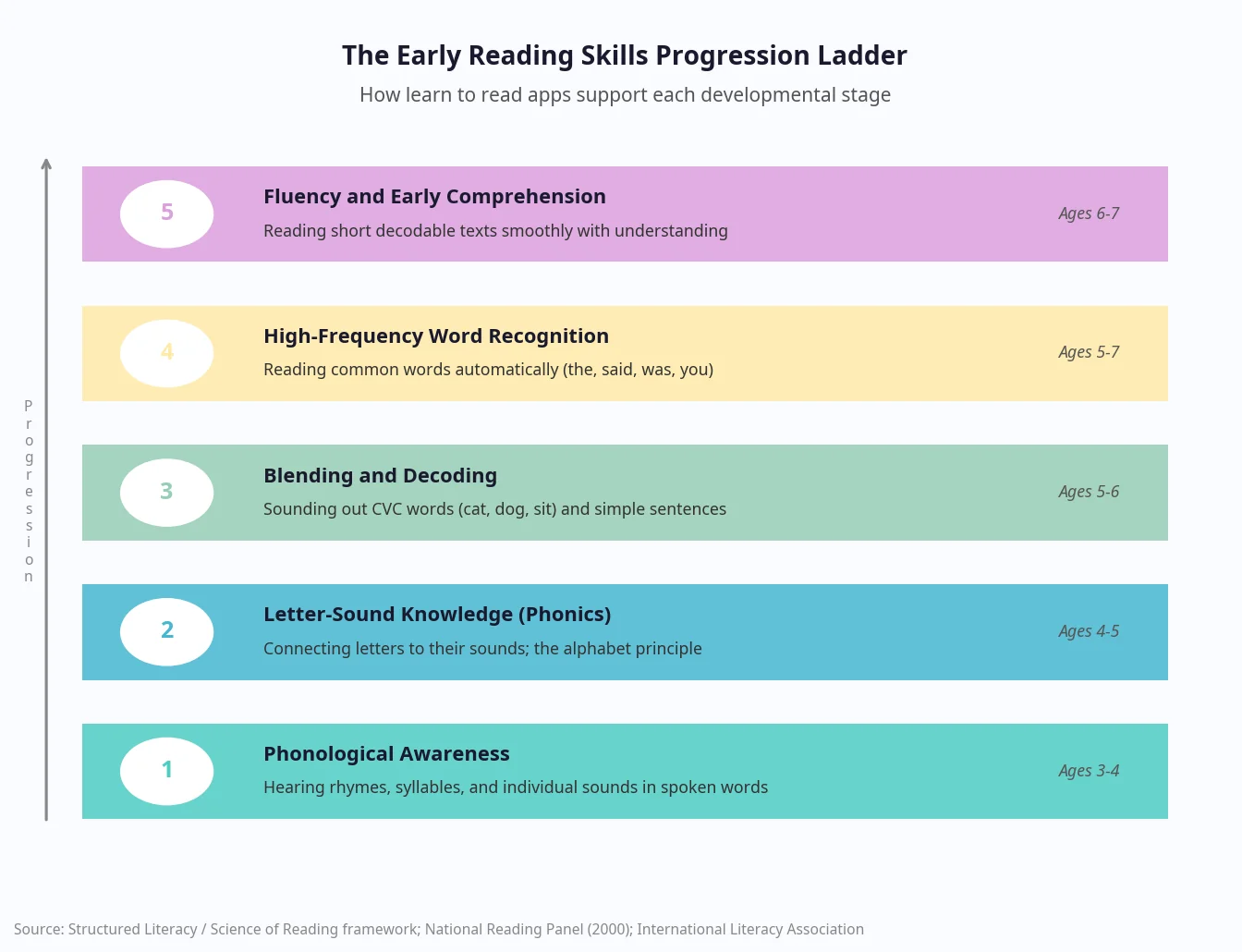
The first critical skill is phonological and phonemic awareness. This involves the ability to hear and manipulate the sounds in spoken language. Quality apps will include activities that ask children to listen for the beginning, middle, or ending sounds in words, setting the stage for reading text.
Following sound awareness is systematic phonics instruction. This is the explicit teaching of letter-sound relationships. An effective app will introduce letters and their corresponding sounds in a logical sequence, teaching children how to map those sounds onto print and blend them together to form words. Research consistently shows that systematic phonics instruction is a highly effective method for teaching early readers. Understanding the full scope of phonics for reading helps parents recognize what quality instruction looks like in a digital format.
Once children can blend sounds, they need practice with decodable words and sentences. Decodable texts use the specific phonetic patterns the child has already learned, allowing them to practice decoding without being frustrated by irregular words. Alongside this, exposure to high-frequency words, or "sight words," helps build reading speed. For parents wondering how to teach high frequency words, apps that use orthographic mapping techniques rather than simple flashcards offer a more robust learning experience. You can also explore the science behind this process in our detailed orthographic mapping guide.
Finally, effective apps support oral language, vocabulary in context, and early reading fluency. As children progress from sounds to words to short, controlled texts, they begin to read with more speed and expression, which ultimately leads to better comprehension.
What Are the Concrete Benefits of Learn to Read Apps for Young Kids?
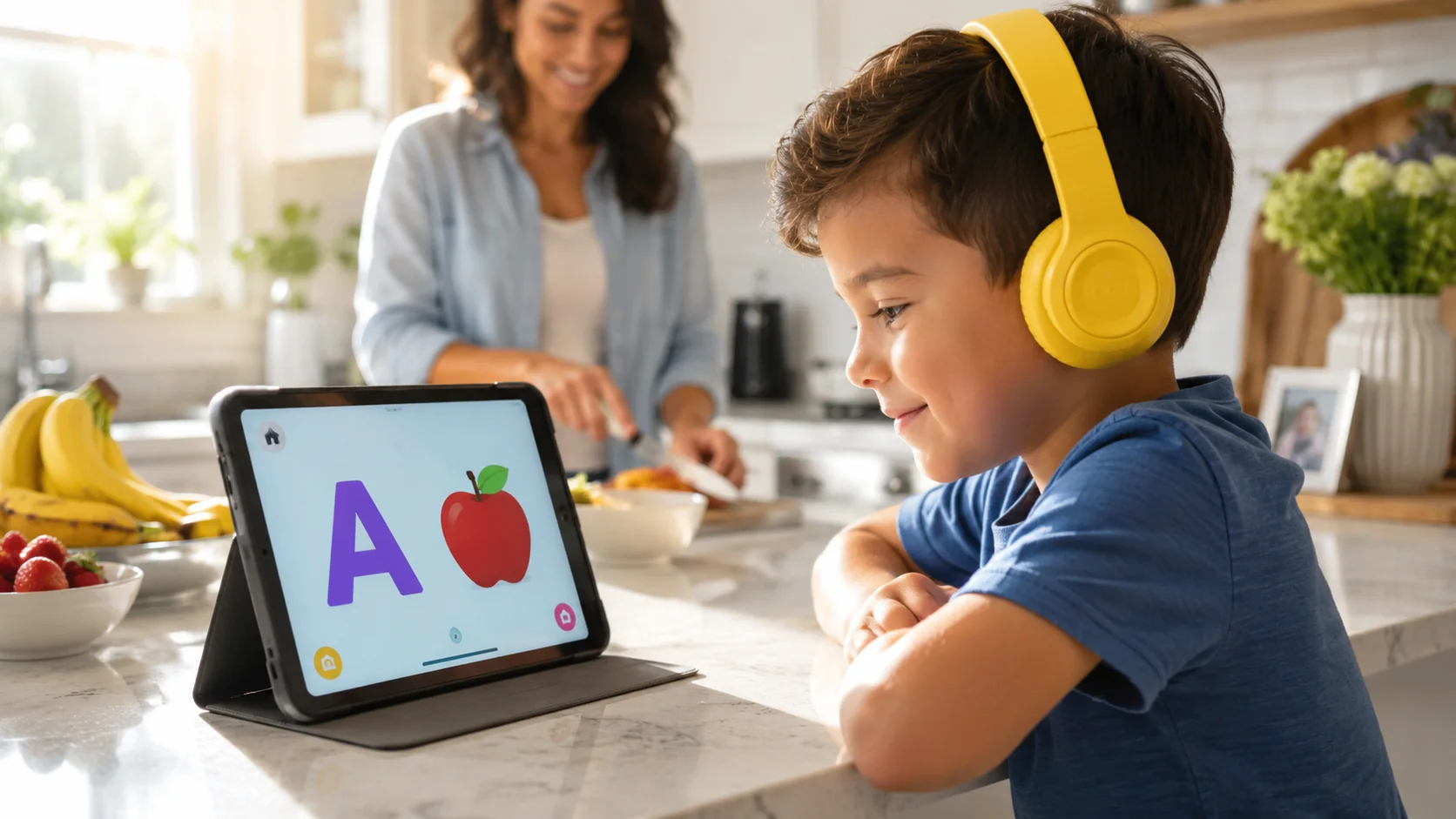
Families often turn to learn to read apps because they offer specific, tangible advantages that traditional worksheets or flashcards may lack. When designed well and used in short, predictable sessions, these digital tools can significantly enhance a child's learning experience.
One of the primary benefits is the opportunity for extra practice without pressure. Learning to read requires immense repetition, which can sometimes become tedious for young children. Apps often gamify this repetition, making it engaging and rewarding. Furthermore, high-quality apps offer personalization and adaptive pacing. They can assess a child's readiness level and adjust the difficulty accordingly, ensuring the child is neither bored by tasks that are too easy nor frustrated by tasks that are too hard.
Motivation is another significant factor. Learn to read apps provide immediate, informative feedback. When a child correctly identifies a sound or word, they receive instant positive reinforcement. If they make a mistake, the app gently corrects them and provides another opportunity to try. This low-stakes environment builds confidence, allowing children to take risks and learn from their errors without the fear of disappointing an adult.
Additionally, these apps support attention through short, goal-oriented tasks. For young children, maintaining focus for long periods can be challenging. Apps break learning down into manageable chunks, making it easier to build consistent routines. This consistent practice leads to visible progress, which can be tracked through a progress dashboard. Seeing their own growth motivates children to continue practicing.
Finally, while apps provide independent practice, they also enrich the offline environment. As children encounter new words and sounds on the screen, those concepts naturally bleed into daily life, prompting richer conversations and a deeper engagement with language.
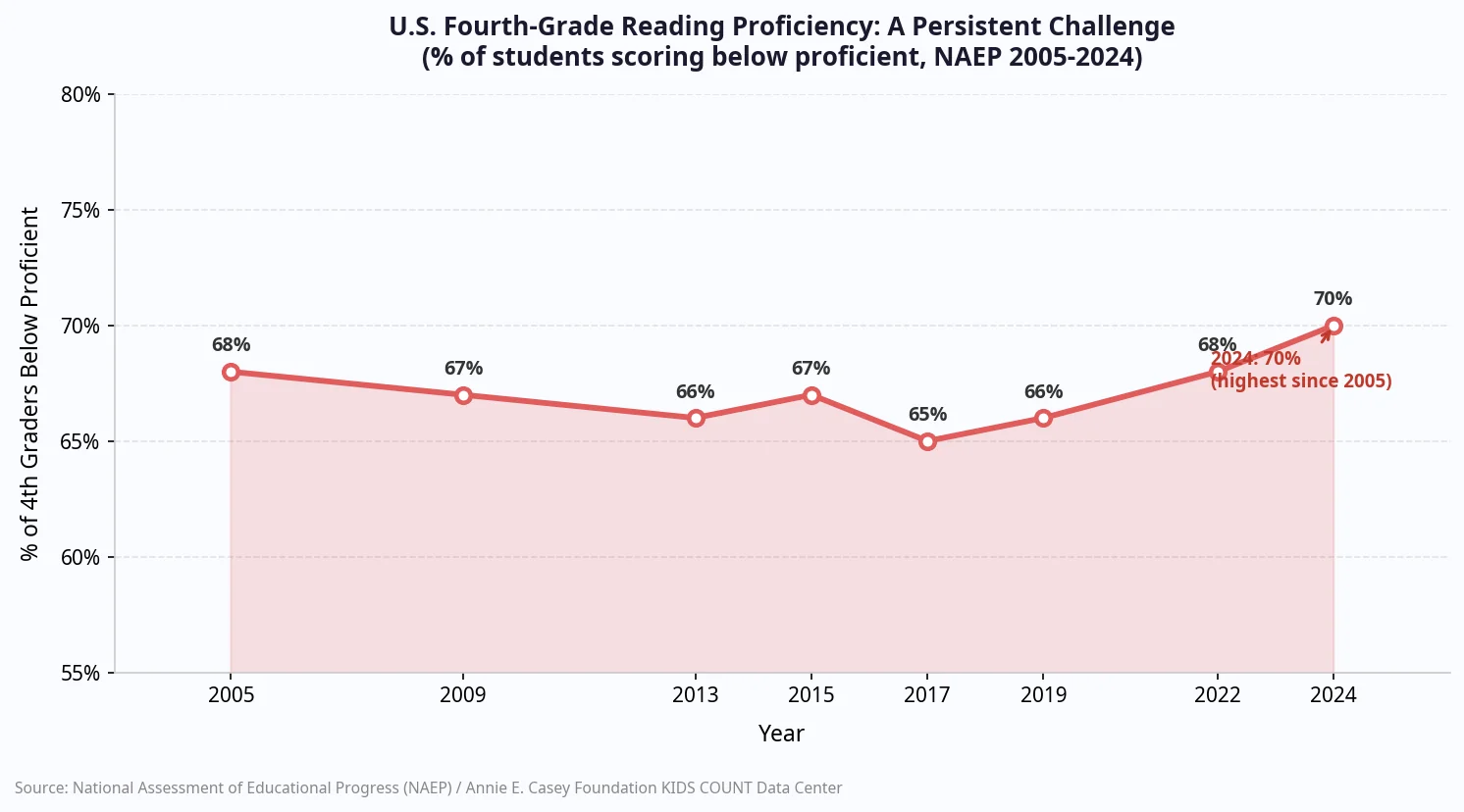
The need for effective, engaging early literacy tools is underscored by national data. Recent statistics highlight a persistent challenge in reading proficiency, with approximately 70% of U.S. fourth graders scoring below the proficient level as of 2024. Tools that provide accessible, targeted practice are a valuable part of addressing this broader educational need.
How Can Parents Choose the Best Learn to Read Apps?
With thousands of educational apps available, selecting the right one can feel overwhelming. A vendor-neutral approach focused on instructional design and child safety is the best way to evaluate options.
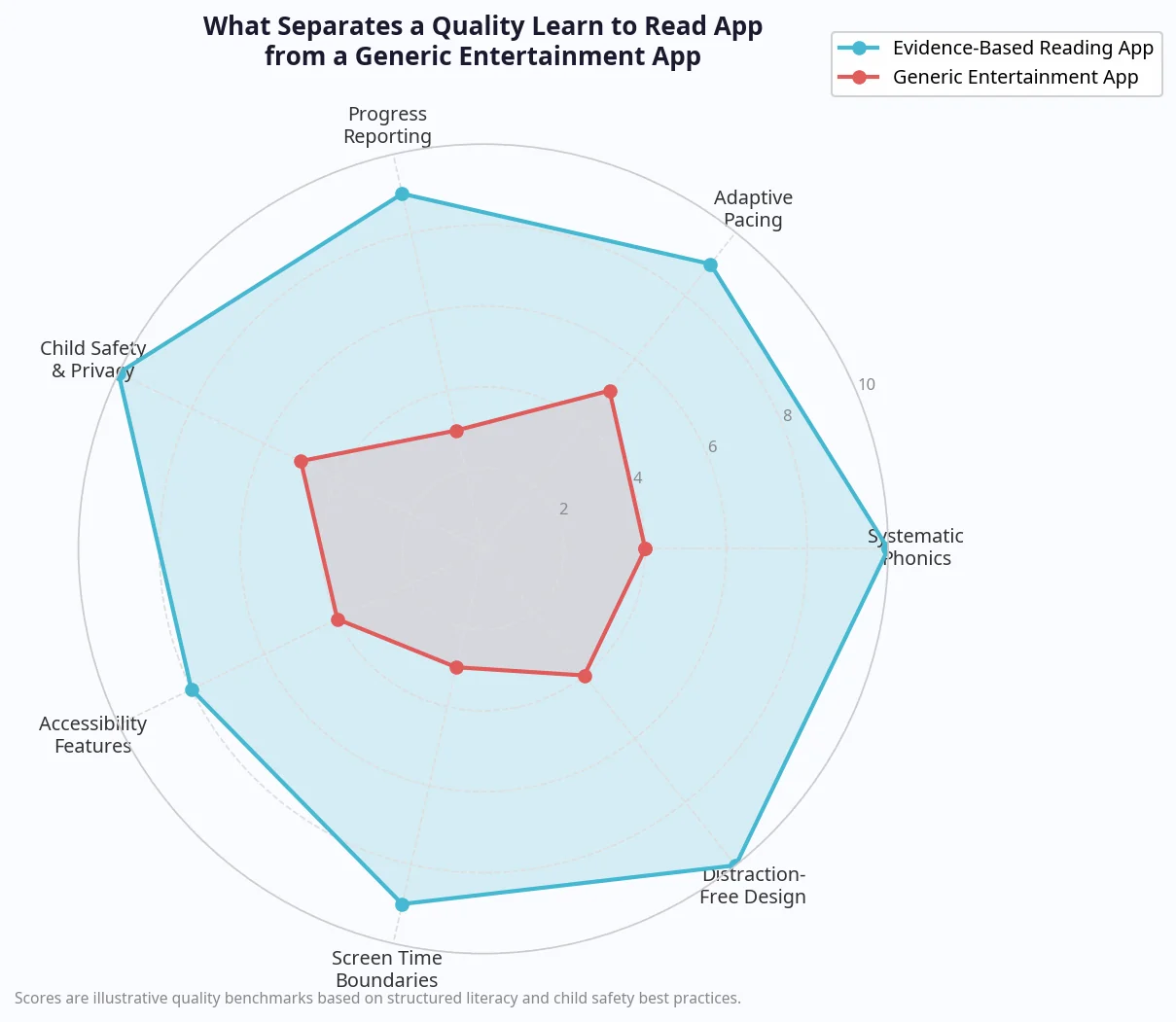
First and foremost, examine the instructional design. The app must feature explicit, systematic phonics instruction. Each activity should have a clear skill focus, rather than presenting a jumbled mix of games. You want an app that teaches, not just one that tests what the child already knows.
Engagement should be purposeful. Look for short challenges, meaningful rewards, and immediate feedback. The app should be adaptive and flexible, allowing children to repeat practice on tricky skills without penalty. If a child struggles with a specific vowel sound, the app should provide more opportunities to practice that sound in different contexts.
Adult support features are also critical. The best apps provide progress reports, skill summaries, and suggestions for offline practice. This transparency allows parents to stay involved and informed about their child's learning journey.
Safety and focus cannot be compromised. The app must be free of advertisements, have minimal pop-ups, and feature child-friendly navigation. Time boundaries are also helpful; sessions should naturally wrap up in a few minutes to prevent extended, passive screen time.
Consider accessibility features as well. Audio support, simple visuals, optional subtitles, and dyslexia-friendly features make the app usable for a wider range of learners. For families navigating specific learning needs, finding tools that accommodate dyslexia or ADHD is essential for a positive experience. Finally, review the privacy policy to ensure transparent data practices and compliance with child-safety regulations. For a deeper dive into evaluating digital tools, parents can explore resources on what makes the best apps for learning to read.
What Are Effective Routines for Using Learn to Read Apps at Home?
Selecting a high-quality app is only the first step; how the app is used determines its impact. Establishing practical, consistent routines ensures that screen time is productive and balanced.
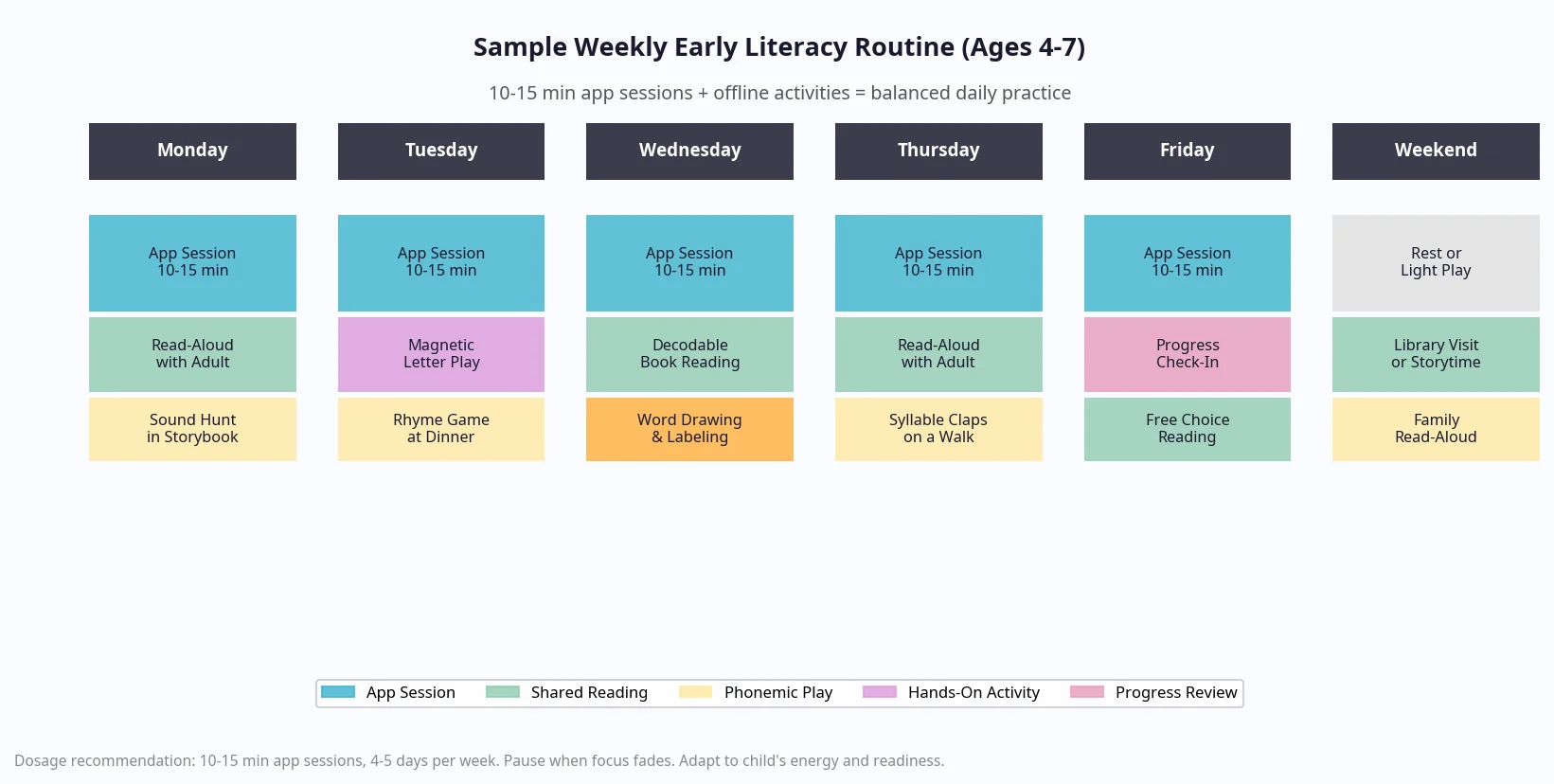
Dosage and timing are key. For young children, 10 to 15 minutes a day, 4 to 5 days a week, is generally sufficient. It is important to pause the session when the child's focus fades. The goal is short, frequent bursts of practice rather than long, fatiguing sessions.
For beginners, co-use is highly recommended. Sit with your child as they use the app, offering encouragement and helping them navigate the interface. As they become more familiar with the routines, you can encourage gradual independence, checking in periodically to celebrate their successes.
Crucially, app time should be paired with offline reading. After an app session, follow up with read-alouds and decodable texts that reinforce the new patterns the child just practiced. This creates a holistic learning experience that connects digital skills to physical books. If you are looking for engaging reading games to complement app time, our guide to reading games for kids offers a range of playful offline activities.
For multilingual learners or children with diverse learning needs, routines may need adjustment. Apps that offer ELL support or cater to speech and language delays can provide targeted assistance, but adult involvement remains vital to help translate those digital lessons into everyday language.
If the child is in school, try to align home app usage with classroom instruction. Use similar terminology when discussing letters and sounds, and share progress snapshots with teachers to ensure a coordinated approach to the child's literacy development.
How Can Families Bridge Learning From Screen to Print?
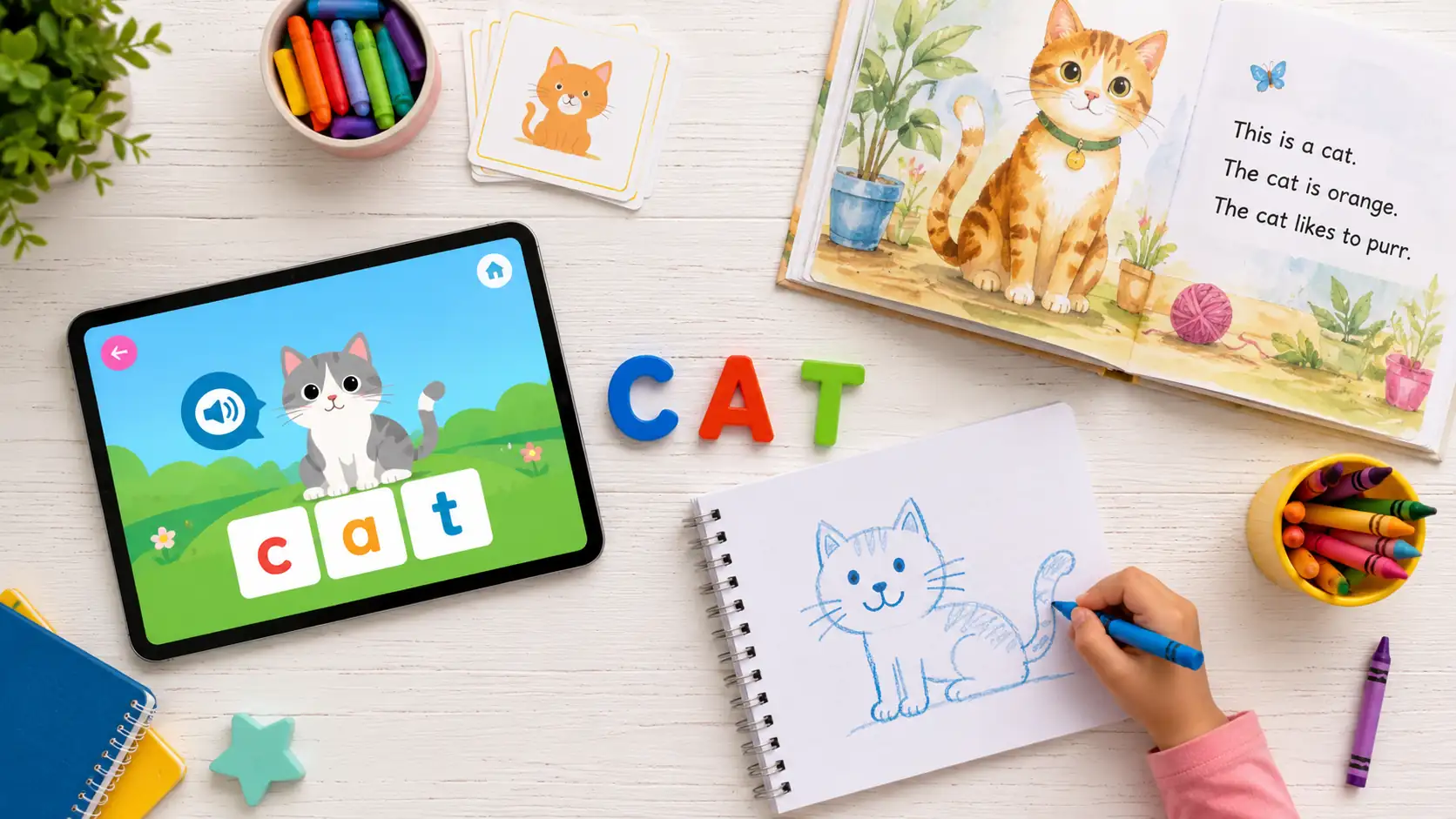
The ultimate goal of using learn to read apps is to help children read real books. To achieve this, parents must actively build bridges between the digital practice and the physical world of print.
One effective strategy is a "sound hunt" in storybooks. If your child practiced words starting with the /m/ sound on their app, open a picture book together and hunt for words that begin with that same sound. This helps the child realize that the sounds they learn on the screen apply to the books they love.
Word-building with physical objects is another excellent bridging activity. Use magnetic letters on the refrigerator to spell out the simple words the child encountered in the app. Have the child segment the word by saying each sound out loud as they place the letter, and then blend the sounds together to read the whole word.
Matching decodable books to app content is a powerful way to build fluency. If the app focused on short 'a' words, visit the Readability library to find a decodable text featuring that pattern. Reading a physical book that aligns with their current skill level provides an immense confidence boost.
Everyday language play also reinforces learning. Play rhyming games during breakfast or clap out the syllables of words while taking a walk. These brief, playful interactions solidify phonological awareness in a natural setting. Finally, encourage your child to use new vocabulary in conversation or by drawing and labeling pictures. Integrating digital learning into daily life is a core concept explored in our guide to engaging vocabulary apps for kids.
How Should Parents Monitor Progress Without Adding Pressure?
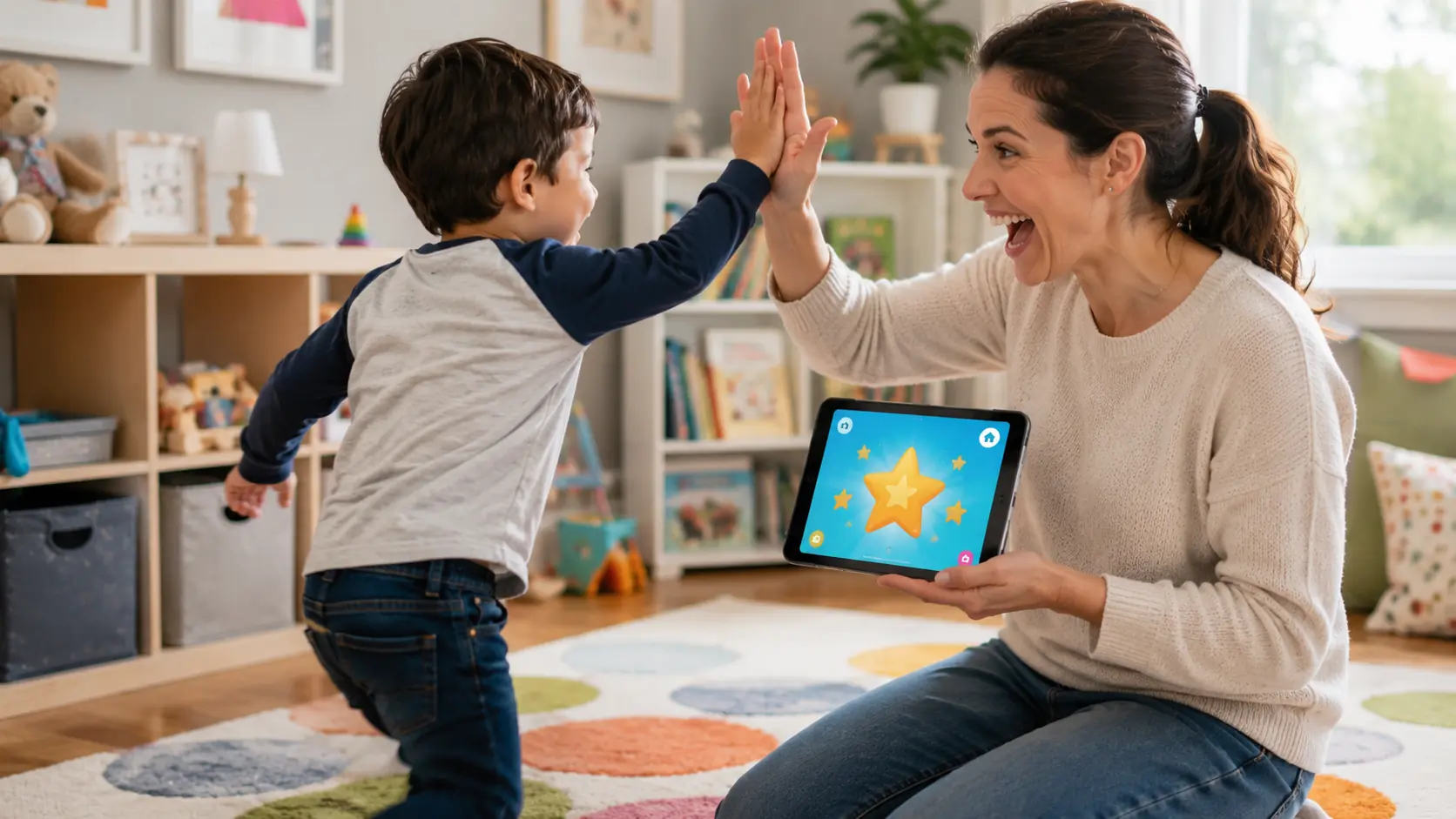
Tracking a child's reading development is important, but it must be done in a way that keeps the tone affirming and growth-oriented. Learn to read apps often provide detailed data, and knowing how to interpret it is key to supporting your child effectively.
When reviewing progress reports, look for specific indicators of mastery. Is the child consistently identifying letter sounds accurately? Are they improving their blending accuracy? Pay attention to their stamina during sessions and note any recurring error patterns. A good app will highlight areas where the child excels and areas where they need more practice.
Interpret pacing recommendations with flexibility. If the app suggests repeating a skill, view it as an opportunity for mastery rather than a failure. Conversely, know when to move ahead if the child is breezing through the content. It is equally important to know when to take a break. If a child is frustrated or fatigued, stepping away from the app is the best course of action.
Celebrate effort, strategies, and curiosity, rather than just perfect scores. Praise the child for trying a difficult word or for sounding out a tricky syllable. This approach fosters a growth mindset, encouraging the child to view challenges as learning opportunities. For parents seeking more detailed frameworks on tracking development, understanding what age a child should read fluently provides helpful context for setting realistic expectations.
What Are the Common Concerns About Learn to Read Apps?
As digital tools become more prevalent, families naturally have questions and concerns about their use. Addressing these proactively helps ensure that learn to read apps are used safely and effectively.
Screen time is a primary concern. The key is to prioritize quality over quantity. Keep sessions short and purposeful. Active, educational engagement with an app is fundamentally different from passive video consumption. Setting clear time boundaries helps integrate the app into a balanced day.
Overstimulation is another valid worry. Some generic apps use flashy animations and loud noises to hold attention, which can be distracting and counterproductive to learning. Choose apps with calm visuals, limited extraneous animations, and clear, purposeful audio cues. The design should focus the child's attention on the educational task, not the bells and whistles.
Privacy and security must be a priority. Before downloading an app, review its data policies. Look for tools that comply with child-safety regulations and are transparent about how they handle user data. Apps that offer an offline mode or do not require constant internet connectivity can also provide an added layer of security.
Accessibility should also be considered. Ensure the app provides necessary audio prompts, pacing controls, and clear icons. Features like adjustable font sizes and high-contrast options make the app more usable for all children, particularly those who might need specific visual accommodations. If you are supporting a child with specific learning differences, our resources on multisensory approaches to reading for dyslexia and understanding dyslexia provide important context.
By addressing these concerns thoughtfully, parents can create a safe, focused digital learning environment that truly supports their child's early literacy development.
Conclusion: Building a Balanced Approach to Early Reading
Learn to read apps can meaningfully support early literacy when they are chosen carefully and used with intention. By focusing on evidence-based skills like systematic phonics and phonemic awareness, these digital tools offer personalized, engaging practice that builds a child's confidence and competence.
The practical benefits of immediate feedback, adaptive pacing, and consistent routines make these apps a valuable addition to a family's educational toolkit. However, the most significant gains occur when digital practice is explicitly connected to the physical world. The real magic happens when the skills learned on a screen meet the rich conversations, physical books, and playful language interactions of daily life.
As you integrate these tools into your home, remember that they are just one part of a broader reading journey. Reflect on the specific skills your child is practicing in their app, and plan a short, matching offline activity this week. Whether it is a sound hunt in a favorite storybook or a rhyming game at dinner, bridging that gap will help foster a lifelong love of reading. To explore how Readability Tutor supports this journey, visit our reading program page or check out our research page to learn about the evidence behind our approach.
Frequently Asked Questions: Learn to Read Apps
How much daily time is appropriate for kids using learn to read apps?
For young children ages 4 to 7, short sessions of 10 to 15 minutes per day, 4 to 5 days a week, are generally recommended. This dosage provides consistent practice without causing screen fatigue, allowing plenty of time for offline reading and play.
At what age should children start using learn to read apps?
Children can begin using early literacy apps around age 3 or 4, focusing initially on phonological awareness and letter recognition. It is important to match the app's content to the child's developmental readiness rather than their exact chronological age. Our guide on when do kids learn to read offers a helpful developmental overview.
Can learn to read apps replace reading physical books with adults?
No, learn to read apps are designed to supplement, not replace, shared reading. Reading physical books with adults builds narrative comprehension, vocabulary, and emotional connection in ways that digital tools cannot replicate.
How do I know if an app teaches phonics effectively?
An effective phonics app will introduce letter-sound relationships systematically and explicitly. It should require the child to actively blend sounds to form words, rather than encouraging them to guess based on pictures or memorize whole words out of context. Our phonics for reading guide explains what structured phonics instruction should look like.
What should I do if my child taps randomly and rushes through the app?
If your child is rushing or tapping randomly, sit with them and guide the session. Encourage them to slow down, listen to the prompts, and think about their answers. If the behavior continues, it may be a sign they are fatigued and the session should end for the day.
How can multilingual families use learn to read apps successfully?
Multilingual families can use these apps to build foundational English phonics skills while continuing to speak and read in their home language. Co-using the app allows parents to translate concepts and discuss the new vocabulary together, bridging the languages. Our ELL support page offers additional guidance for multilingual learners.
What accessibility features should I look for in reading apps for kids?
Look for apps that offer clear audio instructions, adjustable pacing, simple navigation, and options for subtitles or dyslexia-friendly fonts. These features ensure the app is usable and supportive for children with diverse learning needs. Visit our dyslexia support page to learn more about accessibility features designed for struggling readers.
How do I protect my child's privacy when using educational apps?
Protect privacy by reviewing the app's data policy before downloading. Choose apps that are compliant with child privacy laws, do not feature third-party advertisements, and clearly state that they do not sell user data. You can review our own approach on the Readability Tutor FAQ page.