Best Reading Apps for Kids: What to Look For + 10 Top Picks

Help your child build stronger reading skills with the right support. Explore what to look for in reading apps for kids and discover top picks for phonics, fluency, vocabulary, comprehension, and more.

best reading apps for kids and parents
readability tutor is a reading app for kidsreading blocks essential for kids
How Can Reading Apps Help Your Child?


The best reading apps for kids do more than keep your child busy on a screen. They give them opportunities to actively practice reading skills at a level that matches their needs, with support along the way.

Depending on the app, your child can work on:
‍

  • ‍Phonics and decoding: Connecting letters and sounds to read unfamiliar words
  • ‍Reading fluency: Reading more accurately, smoothly, and confidently
  • Vocabulary: Learning new words and understanding what they mean
  • Reading comprehension: Understanding, remembering, and thinking about what they read
  • Independent reading: Practicing with books and activities suited to their current abilities
  • ‍Reading confidence: Building skills through regular, manageable practice


Different apps focus on different areas, so the most useful option for your child depends on the skills they're ready to develop next.

What to Look For in a Reading App for Kids


Not every reading app for kids teaches the same skills or provides the same kind of practice. Before choosing one, consider what your child needs most and how the app supports their development.

Matches Your Child’s Reading Level

Look for an app that meets your child where they are rather than relying only on their age or grade. Ideally, the reading material should become more challenging as their skills develop.

Encourages Active Reading

Games and videos can make learning engaging, but your child should also spend meaningful time actually reading. Look for opportunities to read words, sentences, stories, or books rather than only tapping through activities.

Keeps Reading Engaging

Interesting stories, age-appropriate topics, and activities at the right level can make it easier for your child to stay involved in regular reading practice.

Builds Important Reading Skills

Depending on your child’s needs, look for practice with phonics, decoding, fluency, vocabulary, and comprehension. Some apps focus on one specific skill, while others support several.

Provides Helpful Feedback

When your child gets stuck, timely feedback can help them correct mistakes and continue reading instead of becoming frustrated.

Lets You Follow Their Progress

A useful reading level assessment tool or parent dashboard can help you see what your child is practicing, how their skills are developing, and where they may need additional support.

10 Best Reading Apps for Kids


With so many options available, finding the right app comes down to what your child is learning and the type of practice they need. Some kids reading apps focus on foundational skills like phonics, while others provide reading-aloud practice, comprehension activities, or access to digital books.

Here are 10 reading apps for kids worth exploring, starting with an option designed to provide personalized reading practice and support as your child reads aloud.
‍

best reading apps for kids infographic

1. Readability Tutor — Personalized Reading Practice


Readability Tutor gives your child personalized reading practice with an AI-powered tutor that listens as they read aloud. When your child has trouble with a word, Readability Tutor provides real-time pronunciation support so they can keep reading rather than getting stuck.

The app also helps your child build vocabulary and comprehension through interactive questions and support while providing access to a large library of leveled books. Reading levels adapt as your child develops their skills, and a parent dashboard lets you follow their reading activity and progress over time.
‍

  • Best for: Personalized reading-aloud, fluency, vocabulary, and comprehension practice
  • Grades: K–6
  • Standout features: Real-time reading feedback, adaptive reading levels, comprehension questions, vocabulary support, leveled book library, and parent progress tracking.
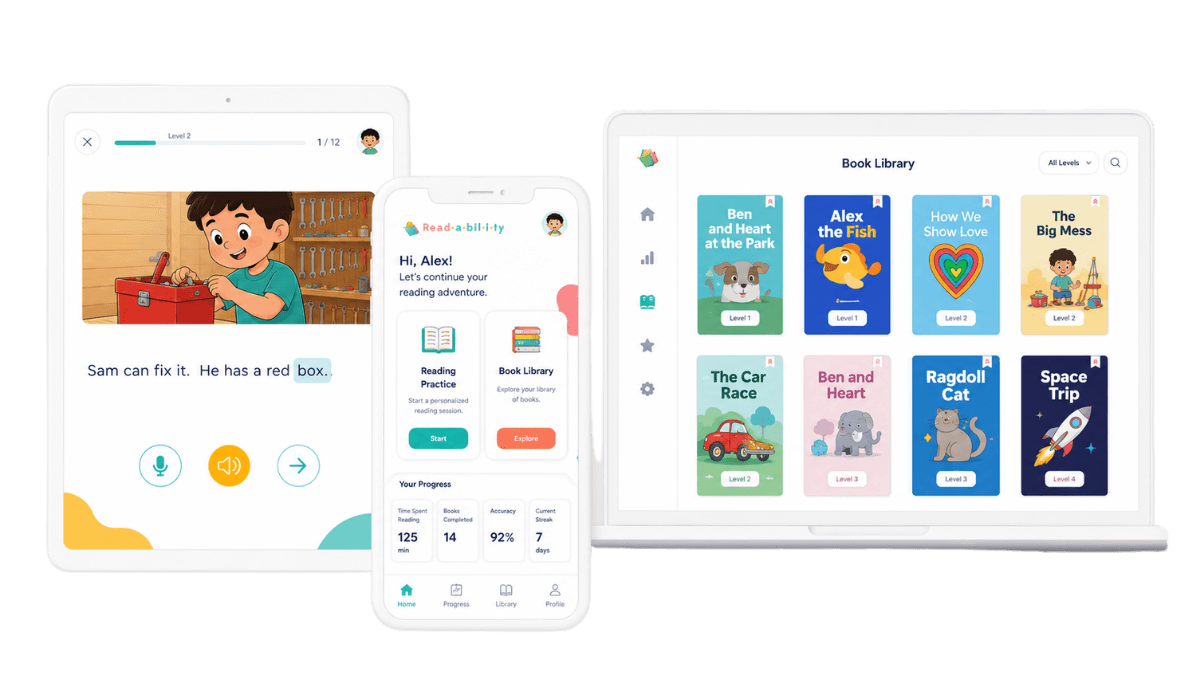

readability tutor app is a reading app for kids that uses ai


Give your child reading support that meets them where they are:
‍

Try 30 Days Free

2. Khan Academy Kids — Early Reading and Phonics Practice


Khan Academy Kids offers free reading and language arts activities for children ages 2–8. Its literacy content covers early skills such as phonemic awareness, letter recognition, phonics and decoding before progressing into vocabulary, comprehension, writing, and spelling.

The app also includes a library of fiction, nonfiction, early readers, and decodable texts. Children can listen to narration with word highlighting, while personalized activities adjust to their level. Because Khan Academy Kids covers subjects beyond reading, it can be a good option for families looking for broader early-learning practice rather than a reading-only program.
‍

  • Best for: Early readers who need foundational literacy practice
  • Grades: 2–8
  • Cost: Free
  • Standout features: Phonics and decoding activities, vocabulary and comprehension practice, books, read-to-me audio, word highlighting, and personalized activities.

3. Duolingo ABC — Early Literacy Through Short, Interactive Lessons


Duolingo ABC
is a free literacy app designed to help young children develop early reading skills through short, interactive lessons and stories. Activities cover foundational skills such as phonemic awareness, phonics, decoding, sight words, vocabulary, fluency, and comprehension.

Lessons use narration, animation, and interactive activities to keep practice approachable for beginning readers. Its learning path progresses through literacy concepts, making it a useful option for children who are still building the foundations they need to read independently.
‍

  • Best for: Beginning readers building foundational literacy skills
  • Grades: 3–8
  • Cost: Free
  • Standout features: Phonemic awareness, phonics, decoding, sight words, interactive stories, vocabulary, and comprehension practice.

4. Epic! — Digital Library for Kids


Epic!
gives children access to a large digital library with more than 40,000 books, including ebooks, Read-To-Me books, and audiobooks. Families can explore books by age, interests, and reading level, making it especially useful for children who benefit from having plenty of choices.

Rather than focusing primarily on teaching foundational reading skills, Epic! is designed to give children greater access to books and encourage regular independent reading.
‍

  • Best for: Exploring books and independent reading
  • Grades: Up to 12
  • Cost: Free and paid options available
  • Standout features: Large digital library, Read-To-Me books, audiobooks, and personalized book discovery.

5. Teach Your Monster to Read — Phonics Through Play


Teach Your Monster to Read
turns early reading practice into an interactive game where children create a monster and guide it through reading adventures. Activities progress from recognizing letter sounds to blending sounds, reading words and sentences, and developing early comprehension skills.

The game-based format makes it a useful option for beginning readers who could use extra practice with phonics and decoding while staying actively engaged.
‍

  • Best for: Beginning readers practicing phonics and decoding
  • Level: Early/beginning readers
  • Cost: Free to play on the website; app pricing varies
  • Standout features: Letter-sound practice, blending and segmenting, sight words, sentences, comprehension activities, and targeted practice.

6. Starfall — Phonics and Early Reading Skills


Starfall
offers a step-by-step learn-to-read program that moves children from learning the alphabet into phonics, fluency, and comprehension. Early activities introduce letter-sound relationships, short and long vowels, sight words, and blending before children progress to fiction and nonfiction reading.

The combination of books, games, songs, and interactive activities makes Starfall particularly useful for beginning readers who benefit from practicing the same foundational skills in different ways.
‍

  • Best for: Phonics and early reading development
  • Grades: Pre-K–5, with its Learn-to-Read sequence focused on beginning readers
  • Cost: Core Learn-to-Read content is free; membership unlocks additional content
  • Standout features: Alphabet practice, phonics, vowel patterns, sight words, interactive books, fluency, and comprehension activities.

7. Vooks — Animated Read-Along Stories


Vooks
turns children's books into animated read-along stories with narration, highlighted text, music, and gentle animation. Children can follow the words as they're spoken, combining the experience of storytime with visual exposure to written text.

Vooks is less focused on direct phonics instruction or independent oral reading practice and more focused on engaging children with stories. Its library also includes ebooks and audiobooks, giving families several ways to enjoy books together or independently.
‍

  • Best for: Read-along storytime and engaging reluctant readers with books
  • Ages: Primarily younger readers, with content extending to older elementary children
  • Cost: Paid subscription with a free trial
  • Standout features: Animated storybooks, read-aloud narration, highlighted text, ebooks, audiobooks, offline viewing, and ad-free content.

8. Raz-Kids — Leveled Reading Practice


Raz-Kids
gives children access to hundreds of interactive ebooks across 29 reading levels. Children can listen to books, read independently, record themselves reading aloud, and complete quizzes that check their understanding of what they read.

As children complete books and comprehension quizzes, they can progress to increasingly challenging reading levels. This makes Raz-Kids useful for structured, leveled practice at school or at home.
‍

  • Best for: Leveled reading and comprehension practice
  • Grades: K–5
  • Cost: Paid subscription
  • Standout features: 29 reading levels, 800+ ebooks, read-aloud audio, oral reading recordings, comprehension quizzes, and progress tracking.

9. Sora — Ebooks and Audiobooks Through School


Sora
is a student reading app from OverDrive that lets children borrow ebooks, audiobooks, magazines, and other digital reading materials available through participating schools. Children can read or listen in the app, look up unfamiliar words, take notes, highlight passages, and track their reading activity.

Because access is connected to a child's school, the selection will depend on what their school or district offers. Sora is particularly useful for children who want more books to read independently rather than direct reading instruction.
‍

  • Best for: Independent reading and borrowing digital books through school
  • Grades: K–6
  • Cost: Free for students through participating schools
  • Standout features: Ebooks, audiobooks, read-alongs, vocabulary definitions, notes and highlights, reading goals, achievements, and accessibility options.

10. PBS KIDS Games — Literacy Practice Through Familiar Characters


PBS KIDS
offers free educational games featuring characters from shows children may already know, including Super Why!, Sesame Street, and more. Literacy-focused games give younger children opportunities to practice skills such as letter recognition, phonics, spelling, vocabulary, reading, and storytelling through interactive play.

Because the app covers many learning areas beyond literacy, it works well as a supplemental option for families looking for short, engaging activities rather than a dedicated reading program.
‍

  • Best for: Fun, supplemental literacy practice
  • Grades: Primarily preschool and early elementary
  • Cost: Free
  • Standout features: Letter and word games, phonics, spelling, vocabulary, storytelling activities, and familiar PBS KIDS characters.

Which Type of Reading App Does Your Child Need?


The right app depends on what your child is ready to work on. A beginning reader learning letter sounds needs different support than a child who can read words accurately but has difficulty understanding a story. Reading development involves multiple areas, so identifying the skill your child needs to strengthen can help narrow down your options.

If your child needs help with...


Recognizing letters and sounds

Sounding out unfamiliar words

Reading smoothly and accurately

Learning new words

Understanding what they read

Finding books at the right difficulty

Becoming more interested in reading

Look for a reading app with...


Phonemic awareness activities

Decoding and word-reading practice

Guided read-aloud practice and feedback

Vocabulary instruction and support

Questions and comprehension activities

Leveled or adaptive reading material

Engaging topics and stories for choice
Can Reading Apps Help Struggling Readers?


Yes. Reading apps for struggling readers can provide additional opportunities to practice specific skills such as phonics, decoding, fluency, vocabulary, and comprehension. The most useful practice will depend on where your child is having difficulty, so look for an app that targets their needs rather than simply offering more reading activities.

Apps can also make it easier for your child to practice regularly at home and receive additional support between school lessons. However, a reading app should be viewed as one part of your child's overall reading support. If your child continues to struggle despite regular practice and instruction, talk with their teacher, reading specialist, or another qualified professional about whether additional assessment or targeted intervention may be helpful.


If you’re wondering whether your child’s reading difficulties could be related to dyslexia, our
free dyslexia test can help you recognize common signs and consider your next steps, from further evaluation to support tools like our dyslexia app for kids. ➜

Signs can vary from child to child, but persistent difficulty sounding out words, reading accurately or fluently, and spelling may be reasons to explore more.

Free vs. Paid Reading Apps for Kids


Both free and paid reading apps for kids can provide useful practice. The better choice depends on your child’s needs, how often they’ll use the app, and the type of support you’re looking for.

Free apps can be a great way to introduce new reading activities or supplement what your child is already learning. Paid apps may offer more extensive book libraries, personalized learning paths, real-time feedback, progress tracking, or other features designed for ongoing practice.

When comparing your options, consider:
‍

  • Content: How much reading material and practice does your child have access to?
  • Personalization: Does the app adjust to your child’s reading level or skills?
  • Feedback: Does your child receive help when they make a mistake or get stuck?
  • Progress tracking: Can you see what your child is practicing and how they’re progressing?
  • Ads and purchases: Are there advertisements or in-app purchases that could interrupt your child’s experience?
  • Value: Will your child use the features often enough to make a subscription worthwhile?


If you want to explore more no-cost options, check out our guide to free reading programs for kids. You can also explore dyslexia games for kids for hands-on exercises, online games, and reading activities you can try at home.

How Much Reading Practice Does Your Child Need?


There’s no perfect number of minutes for every child. Focus on making reading practice regular, manageable, and appropriate for your child’s current skills.
‍

  • Keep it consistent and manageable: Regular, shorter reading sessions can help your child build skills without making practice feel overwhelming.
  • Mix up reading practice: Combine reading apps with physical books, audiobooks, library visits, writing, and reading together.
  • Follow your child’s lead: Choose practice that challenges your child enough to build new skills while still giving them opportunities to succeed.

Make Reading Practice More Personal With Readability Tutor

As your child reads aloud, Readability Tutor listens and provides real-time pronunciation support. They can build fluency, vocabulary, and comprehension with a large library of leveled books, while you track their progress from the parent dashboard. 👇

The right reading app for kids should meet your child where they are and give them opportunities to build their skills at their own pace.

How AI can Support Students with Dyslexia
Learn More
Dyslexia reading programs
How Can Parents Find Dyslexia Reading Programs?
Learn More
Young boy reading
How to Help a Child with Dyslexia Read
Learn More

Frequently Asked Questions:
More on Reading Apps for Kids

What are the best reading apps for kids?

The best reading apps for kids depend on your child’s age, current reading level, and the skills they need to practice. Look for an app that supports areas such as phonics, decoding, fluency, vocabulary, or comprehension while providing reading material at an appropriate level. For personalized reading-aloud practice, Readability Tutor is designed to listen as your child reads and provide support along the way.

What should I look for in a reading app for my child?

Look for an app that matches your child’s current abilities, provides meaningful opportunities to actually read, and targets the skills they need to develop. Helpful features can include personalized reading levels, immediate feedback, comprehension practice, engaging books, and progress tracking for parents.

Are reading apps good for kids learning to read?

Learn-to-read apps for kids can provide additional practice with foundational skills such as phonemic awareness, phonics, decoding, and vocabulary. They’re most useful as one part of a broader reading experience that also includes instruction, books, conversations, and opportunities to read with others.

Can reading apps help improve reading comprehension?

Yes. Reading comprehension apps for kids can give children opportunities to practice understanding what they read through questions, vocabulary support, story discussions, and activities that encourage them to recall details and think about meaning. Look for an app that combines comprehension practice with reading material appropriate for your child’s current level.