Finding the best educational apps for 1st graders is harder than it should be. Most parents are not short on options. They are short on clarity. The app store is full of products that promise learning, engagement, and fast progress, yet many of them blur the line between instruction and entertainment. For a first grader, that distinction matters. At this stage, children are not just spending time with words. They are learning how reading works.
The direct answer is simple: the best educational apps for 1st graders are the ones that teach reading in a structured way, reinforce the skills children are learning in school, and turn short bursts of screen time into better reading off the screen. They should help children practice phonemic awareness, phonics, high-frequency words, fluency, vocabulary, and comprehension in a sequence that makes sense, while also giving parents enough visibility to know whether the app is actually helping.
A strong educational app is not valuable because it keeps a child busy. It is valuable because it supports the real work of first grade reading and fits into a healthy home routine. The sections that follow explain why first grade is such a decisive reading year, what separates useful apps from digital busywork, how families can evaluate fit, and how to make app time lead to meaningful reading growth rather than isolated screen activity.
Why First Grade is the Year App Choices Matter
First grade is often the year when reading instruction becomes more demanding and more visible. Children move beyond basic letter familiarity and begin applying sound-symbol knowledge to actual words, sentences, and short passages. This is also the point where small gaps can become more noticeable. A child who has trouble blending sounds, recognizing common words quickly, or reading connected text smoothly may start to feel that reading is difficult before they have had enough successful practice.
Research on early literacy helps explain why this stage matters so much. The National Reading Panel identified phonemic awareness, phonics, fluency, vocabulary, and comprehension as core components of effective reading instruction, and it found that explicit phonemic awareness instruction improves reading and spelling when it is taught systematically as part of a broader reading program. The What Works Clearinghouse makes a related point in its guidance for kindergarten through third grade: children need instruction in how sounds connect to letters, how to decode words and analyze word parts, and how to read connected text every day to build accuracy, fluency, and comprehension.

A first grader does not become a stronger reader by collecting isolated game points. Progress usually moves from sound awareness to phonics, from phonics to more automatic word recognition, from word recognition to fluency, and from fluency to better comprehension. Once parents understand that sequence, they are better prepared to spot whether an app supports real reading growth or simply imitates it.
That developmental view also creates a stronger standard for evaluating digital products. Parents do not need an app that claims to teach “everything.” They need one that strengthens the next step in the reading sequence their child is currently learning.

What the Best Educational Apps for 1st Graders Have in Common
The strongest apps for first graders share a recognizable instructional logic. They do not simply present words and wait for children to guess. They teach a skill, provide enough guided practice for the child to notice the pattern, and then give the child a chance to use that pattern in meaningful reading. In other words, they behave more like a well-organized lesson than a collection of mini-games.
That structure matters because early reading growth depends on cumulative learning. Children are more likely to succeed when they can move from a taught pattern to a controlled reading experience, then return to the same pattern often enough for it to become familiar. This is one reason explicit teaching is so important in the research base. A first grader benefits from knowing what is being learned and from seeing it again in context.
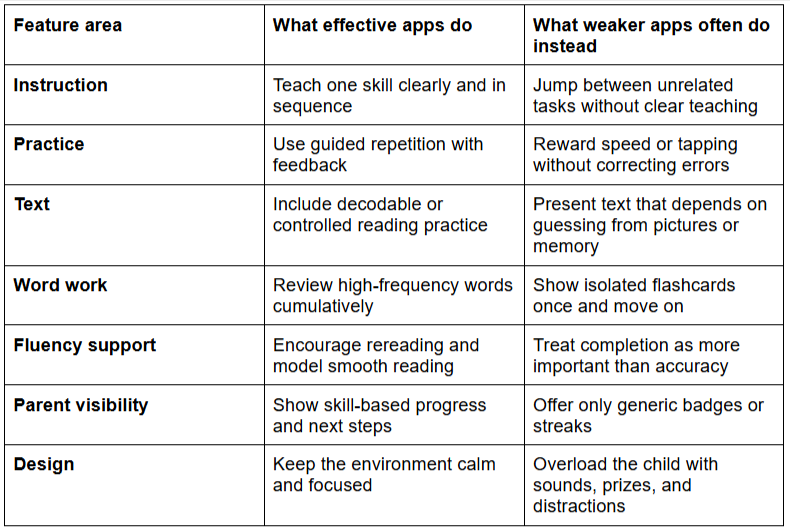
This distinction between instruction and digital busywork is one of the most important ideas for families to understand. Many apps look polished and educational because they include letters, quizzes, or cheerful voices. But a strong educational app is defined by whether it changes what the child can do as a reader. If a child enjoys an app but cannot transfer anything from the lesson into real reading, the app may be occupying time without building skill.
A useful rule of thumb is to ask whether the app supports mastery or only engagement. Engagement helps, but mastery is the real goal. A child should come away from the lesson more able to read a pattern, recognize a word type, or make sense of a short text. That is the standard that separates productive educational technology from screen time that only feels productive.
How to Choose an App that Fits your Child
Parents often make app decisions the same way people shop for consumer products: by looking for the highest ratings, the biggest claims, or the broadest features. That approach rarely works well in first grade reading because the best app is not the one with the most features. It is the one that fits the child’s current reading needs.
A child who is still shaky with blending sounds needs different support from a child who can decode accurately but reads in a slow, effortful way. Another child may be getting through the words but struggling to retell what the sentence meant. These differences matter because effective practice is specific. The closer the app aligns to the child’s actual bottleneck, the more useful it becomes.
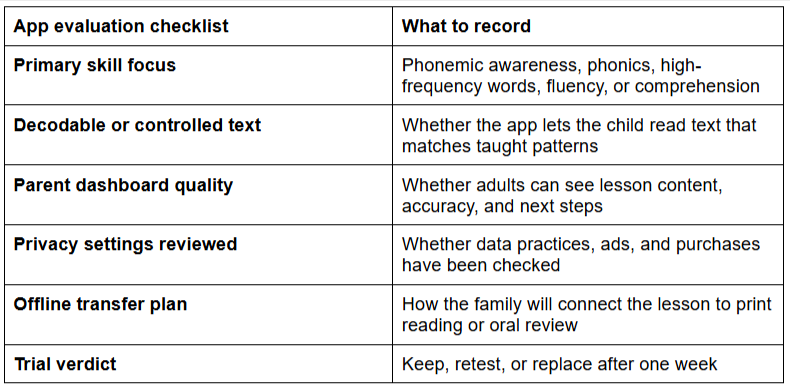
Adults need to know which skills were practiced, where accuracy is improving, and what should happen next at home. The mockup below illustrates the kind of dashboard that helps families act on progress rather than simply admire it.
First graders benefit more from repeated contact with a coherent instructional sequence than from constantly switching formats. If families want a simple standard, it is this: keep the app if it makes reading outside the app easier. Replace it if it does not.
Choosing well is only half the job, though. Even the right app will produce limited value if it remains trapped inside the device. For real progress, children need to carry what they practiced into actual reading.
Why App Time Only Works when it Connects to Reading off the Screen
Educational apps can support reading growth, but they are rarely powerful on their own. First graders still learn best through a combination of direct instruction, repetition, conversation, and application. That last part matters most. If a child practices a vowel pattern on the screen and then sees the same pattern in a short printed passage, the learning becomes more stable. If the child answers a simple question in the app and then talks about the same story with an adult, comprehension becomes more flexible.
This is also where adult involvement becomes important. The American Academy of Pediatrics has emphasized that young children benefit more from high-quality media experiences when adults stay involved and when media use does not displace other developmentally healthy activities. Although first graders are slightly older than the preschool age range discussed in that policy statement, the principle still applies: educational technology works best when it is purposeful, shared when possible, and balanced with real-world interaction.
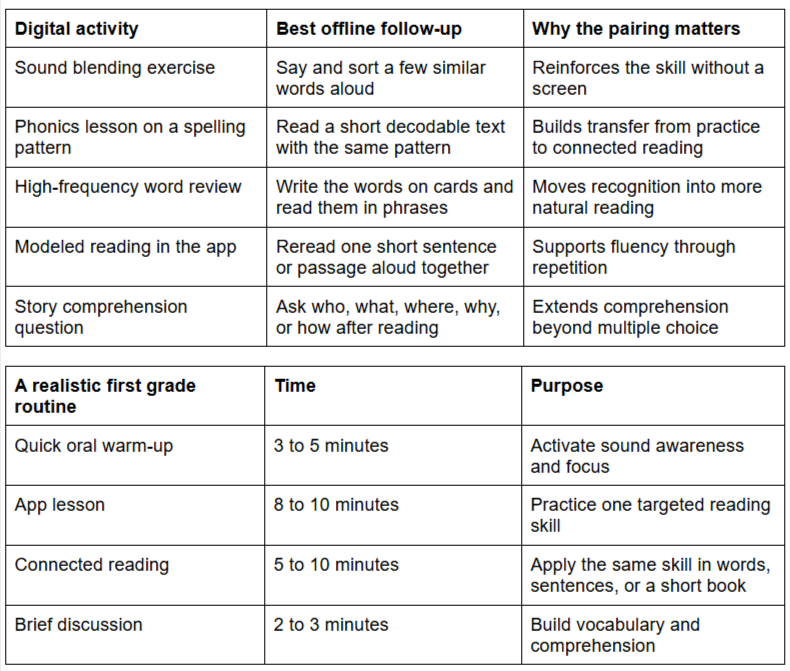
The routine works because it treats the app as one part of a reading system. Families do not need a complicated literacy block to benefit from educational technology. They need a rhythm that helps the app reinforce reading rather than replace it. Once that rhythm is in place, the next issue is sustainability: the app must also be safe, low-distraction, and worth the screen time it requires.

The Safety, Privacy, and Screen-time Issues Parents Should Solve Up Front
For first graders, app quality is not just about instruction. It is also about the environment. A well-designed literacy app should make it easier for a child to focus, not harder. If it includes aggressive ads, in-app purchases, intrusive notifications, or confusing navigation, it creates cognitive noise around the learning task. That noise matters because young children have limited attentional bandwidth, and reading itself is already demanding.
Privacy deserves the same level of attention. The FTC explains that the Children’s Online Privacy Protection Rule, or COPPA, applies to operators of online services directed to children under 13, as well as operators with actual knowledge that they are collecting personal information online from a child under 13. For parents evaluating first grade apps, that means data collection, parental notice, and permission are not side issues. They are part of the quality check.

The goal is not to eliminate screens categorically. It is to make sure that screen use is purposeful enough to justify itself. In practical terms, most first graders do well with short, focused sessions that end before fatigue or drift sets in. When children leave the device still attentive enough to read, talk, or review a few words with an adult, the app is serving the larger goal. When the app invites endless play after the lesson is done, it starts to compete with the very habits it is supposed to support.
The best educational apps for 1st graders do not succeed because they are flashy, popular, or endlessly entertaining. They succeed because they match the actual demands of first grade reading. They teach skills in sequence, support repeated practice, make room for connected text, and help adults see whether learning is transferring into real reading. That is the difference between an app that feels educational and one that genuinely is.
For families, the practical takeaway is straightforward. Start with the reading problem your child actually has. Choose one calm, well-structured app that teaches that skill clearly. Use it in short sessions, and always connect the lesson to reading away from the screen. When digital practice leads to smoother decoding, stronger word recognition, better comprehension, and more confident reading in everyday life, the app has earned its place.
FAQ: Best Educational Apps for 1st Graders
What are the best educational apps for 1st graders really supposed to teach?
They should teach the core building blocks of early reading: phonemic awareness, phonics, high-frequency words, fluency, vocabulary, and comprehension. If an app is mostly games and rewards without a clear instructional sequence, it is unlikely to help much.
How much time should a first grader spend on an educational app each day?
For most children, about 10 to 15 focused minutes is enough when the app is paired with reading off the screen. Short daily sessions usually work better than long sessions that cause fatigue or drift.
Can a reading app replace reading with a parent or tutor?
No. An app can reinforce skill practice, but first graders still benefit from adult guidance, discussion, read-alouds, and real books. Apps work best as part of a broader reading routine rather than as a substitute for it.
How do I know if an app is actually helping my child read better?
Look for a transfer. Your child should begin recognizing patterns in books, reading familiar text more smoothly, making fewer repeated errors, or talking more clearly about what was read. Points and streaks matter less than visible reading growth.
Should I choose one app or several?
In most cases, one core app is better. Too many tools create novelty but reduce consistency. First graders usually benefit more from a stable instructional routine than from multiple platforms competing for attention.
What should I avoid when choosing educational apps for first graders?
Avoid apps with weak teaching, excessive animation, frequent ads, unclear privacy policies, or texts that are too hard for the child to read without guessing. If the app creates distraction or confusion, it will undercut learning.